


So you’ve heard the buzz about UI/UX design and want to know what it really takes to become a designer who builds experiences users love?
Perfect.
In this complete beginner’s guide, you’ll learn:
- What UI/UX design actually means (and the difference between them)
- The core skills you need to become a UI/UX designer
- The tools you’ll be using daily
- How to learn UI/UX design — even if you’re starting from zero
- Realistic steps to go from beginner to expert
- Common FAQs about building your career in UX/UI
Let’s dive straight in.
I have been in this space for a very long time, and today I would be sharing every piece of information you need to know about UIUX designer
What Is UI/UX Design?
UI/UX design stands for User Interface and User Experience design.
While the two terms are often used together, they’re not the same thing:
- UX (User Experience) focuses on how a user feels when interacting with a product — the flow, logic, and usability.
- UI (User Interface) focuses on how the product looks — the visual style, layout, typography, color palette, and interactivity.
Think of it like this:
UX is the journey.
UI is the map.
A UX designer ensures the journey is smooth and satisfying. A UI designer ensures it looks beautiful and intuitive.
Together, they make digital experiences that users love — from apps and websites to dashboards, software, and even smart devices
In essence, how easy your product interface is would determine if the users would stay or not, sp the better the user interface you hav,e the better
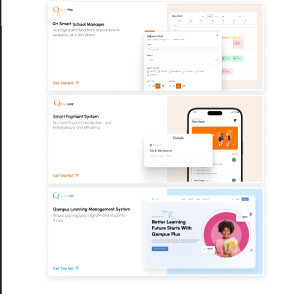
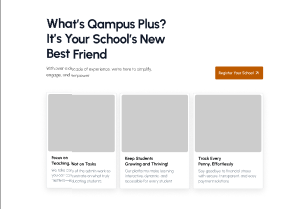
Here is an image of a product we recently designed for a school management solution company
Why UI/UX Design Matters in 2025
Great UI/UX design is what keeps them engaged. It’s the difference between:
- A confusing checkout page that loses customers vs. a seamless one that boosts sales.
- An app that feels clunky vs. one that feels effortless.
And businesses are noticing.
According to recent job reports, UI/UX design ranks among the top 10 most in-demand tech roles worldwide. With AI transforming industries, human-centered design remains irreplaceable — because no algorithm can fully understand emotion, empathy, and context the way humans can.
What Does a UI/UX Designer Actually Do?
A UI/UX designer’s job isn’t just about making things “look pretty.” It’s about solving problems.
Here’s what you might do day to day:
- Conduct user research to understand audience needs.
- Create personas — fictional representations of your ideal users.
- Sketch wireframes — low-fidelity layouts that show structure and flow.
- Build prototypes — interactive mockups of how the product behaves.
- Perform usability testing to see how real users interact.
- Design visual interfaces — using color, icons, typography, and grids.
- Collaborate with developers to ensure your designs are implemented accurately.
In short, you’re the bridge between users, business goals, and technology.
The Core Skills You Need to Become a UI/UX Designer
If you’re starting from scratch, here are the essential skill categories to focus on:
1. User Research and Empathy
UX begins with understanding people.
You must be able to:
- Conduct surveys, interviews, or usability tests
- Identify pain points and needs
- Analyze patterns in behavior
- Build empathy for your target audience
This helps you design solutions that solve real problems.
2. Wireframing and Prototyping
Wireframes are the skeleton of your design — they show the structure before adding visuals.
Prototypes take it a step further by letting users interact with your ideas before development.
Learn tools like:
- Figma (industry standard for wireframes & prototypes)
- Sketch (macOS favorite for UI)
- Adobe XD (for quick prototyping)
- Balsamiq (for low-fidelity wireframes)
Prototyping helps you test ideas fast and iterate before wasting time coding.
3. Visual Design and Branding
This is where UI comes alive.
You’ll learn how to:
- Use color psychology effectively
- Apply typography hierarchy
- Maintain spacing and alignment for visual balance
- Build design systems for consistency
- Follow accessibility guidelines (contrast ratios, readable fonts, etc.)
Tools for this include Figma, Illustrator, and Photoshop.
4. Information Architecture & Interaction Design
Information architecture is about organizing content logically. Interaction design focuses on how users interact with elements.
For example:
- What happens when you hover over a button?
- How do menus expand or collapse?
- How do animations guide attention?
These small details make a huge difference in usability.
5. Collaboration and Communication
UI/UX design is rarely solo work.
You’ll need to:
- Present your ideas clearly to stakeholders
- Explain design decisions using data, not opinions
- Work with developers to ensure pixel-perfect implementation
- Accept feedback and iterate
Soft skills like empathy, curiosity, and storytelling are just as important as design skills.
6. Basic Front-End Knowledge
You don’t need to be a developer — but knowing how HTML, CSS, and basic JavaScript work will help you design more realistic interfaces and communicate better with engineers.
A beginner should at least understand:
- How responsive layouts work
- CSS grid and flexbox concepts
- What affects page speed
- The basics of accessibility and ARIA labels
Tools Every UI/UX Designer Should Know
Here are the most common tools used by top designers today:
| Category | Tools |
|---|---|
| Wireframing & Prototyping | Figma, Adobe XD, Sketch, InVision |
| User Research & Testing | Maze, Hotjar, Optimal Workshop, UserTesting |
| Collaboration & Handoff | Zeplin, FigJam, Miro, Notion |
| Design Systems & Assets | Figma libraries, Zeroheight, Storybook |
| Analytics | Google Analytics, Mixpanel, Amplitude |
Start with Figma — it’s free for individuals, beginner-friendly, and covers 90% of what you’ll need early on.
How to Learn UI/UX Design (Step by Step)
Here’s a practical roadmap you can follow to go from beginner to professional UI/UX designer — even if you’re learning online.
Step 1: Understand the Fundamentals
Before touching Figma, understand the core principles of design and usability.
Study:
- Design thinking process (Empathize → Define → Ideate → Prototype → Test)
- Visual hierarchy & Gestalt principles
- Color theory and typography basics
Recommended resources:
- “Don’t Make Me Think” by Steve Krug
- “The Design of Everyday Things” by Don Norman
Step 2: Learn UI/UX Tools
Start with Figma. Learn how to:
- Create frames and components
- Use Auto Layout for responsive designs
- Build prototypes with transitions
- Use plugins for icons, colors, and accessibility checks
You can learn all this for free on YouTube (channels like Flux Academy, DesignCourse, and AJ&Smart).
Step 3: Practice with Real Projects
Design something real — a landing page, a mobile app, or a simple website redesign.
Use Dribbble or Behance for inspiration, but always aim for functionality, not just looks. Post your work publicly to get feedback.
Step 4: Study User Experience
Learn how to research and test users:
- Create simple surveys
- Conduct usability tests with friends
- Analyze feedback
- Iterate your design
Tools like Maze or Hotjar make this easy, even for beginners.
Step 5: Build a Portfolio
Your portfolio is your passport in UI/UX.
It should include:
- 3–5 case studies showing your process
- Problem → Research → Wireframe → Prototype → Solution
- Screenshots, notes, and what you learned
A clean Notion or Behance portfolio works perfectly for beginners.
Step 6: Get Mentorship or Join a Community
Join UI/UX communities like:
- Design Buddies (Discord)
- Reddit r/userexperience
- UX Design Slack groups
- Figma Community
Getting feedback accelerates your growth 10x faster than working alone.
Step 7: Keep Practicing and Iterate
Design trends evolve constantly. Keep updating your knowledge:
- Follow designers on X (formerly Twitter) and LinkedIn.
- Subscribe to newsletters like UX Planet, Sidebar.io, and Smashing Magazine.
- Redesign existing apps (e.g., Spotify, Airbnb) as practice.
Where to Learn UI/UX Design Online
Here are trusted platforms offering beginner-friendly and professional UI/UX courses:
| Platform | Course | Highlights |
|---|---|---|
| Coursera | Google UX Design Professional Certificate | 100% beginner-friendly, includes projects |
| Udemy | The Ultimate Figma & UX Design Bootcamp | Affordable, hands-on lessons |
| Interaction Design Foundation (IDF) | UX Fundamentals to Advanced UX Research | Deep theory + real-world examples |
| DesignLab | UX Academy | 1-on-1 mentorship & portfolio building |
| CareerFoundry | UI/UX Design Program | Job-ready track with mentorship |
| YouTube | Flux Academy, AJ&Smart, DesignCourse | Free tutorials and case studies |
Start free if you’re testing interest; invest in paid mentorship once you’re serious.
Estimated Timeline to Become Job-Ready
Here’s a realistic path for a self-learner:
| Stage | Duration | Focus |
|---|---|---|
| Beginner | 0–3 months | Learn basics of design principles & tools |
| Intermediate | 3–6 months | Build 2–3 projects, understand UX testing |
| Portfolio Ready | 6–9 months | Case studies + presentable projects |
| Job Hunting | 9–12 months | Apply for internships, freelance gigs, or junior roles |
You can speed this up with consistent daily practice — even 1–2 hours a day adds up fast.
What Makes a Great UI/UX Designer
Here are the traits top companies look for:
- Empathy: You can understand users’ emotions and pain points.
- Curiosity: You ask why before you design.
- Analytical thinking: You use data to make design decisions.
- Attention to detail: Every pixel, spacing, and animation matters.
- Adaptability: You stay up-to-date with new tools and design systems.
- Storytelling: You can explain your design process clearly and persuasively.
If you cultivate these soft skills along with your technical ability, you’ll stand out quickly in the job market.
Common Career Paths for UI/UX Designers
Once you’re skilled, you can specialize in areas like:
- Product Designer – end-to-end digital product design
- UX Researcher – deep dive into user behavior and testing
- Interaction Designer – animations and motion experiences
- Visual Designer – advanced UI and branding
- UX Writer – copy and micro-interactions
- Design System Specialist – creating scalable component libraries
Average salaries range from $45,000 to $120,000+ depending on region and experience.
Final Thoughts on Definitive guide to UI/UX designer
Becoming a UI/UX designer isn’t about being artistic — it’s about being empathetic.
It’s one of the few tech careers where creativity meets problem-solving, and anyone can start — no computer science degree required.
If you focus on understanding users, mastering design tools, building real projects, and refining your storytelling skills, you’ll grow from beginner to expert faster than you think.
Consistency beats talent here. Practice daily, study real interfaces, and never stop asking:
“How can I make this simpler and more human?”
Frequently Asked Questions regarding UI/UX
1. Do I need to know how to code to become a UI/UX designer?
No. You can start without coding. However, understanding HTML and CSS helps you communicate better with developers and design realistic interfaces.
2. What’s the difference between UI and UX?
UX is about how the product feels; UI is about how it looks. UX focuses on structure, flow, and satisfaction, while UI focuses on colors, fonts, and layouts.
3. How long does it take to become a UI/UX designer?
With focused self-study, most beginners reach job-ready level in 9–12 months. Full-time bootcamps may accelerate that to 6 months.
4. Is UI/UX design hard to learn?
It’s challenging at first because it combines creativity and logic, but not “hard.” With consistent practice and mentorship, anyone can learn it.
5. What kind of laptop or software do I need?
A laptop capable of running Figma or Adobe XD smoothly (8GB RAM minimum). Most tools are cloud-based, so you don’t need a high-end machine.
6. Can UI/UX designers work remotely?
Yes — UI/UX design is one of the most remote-friendly careers in tech. Many designers freelance or work for global companies online.
7. What’s the best way to practice UI/UX?
Redesign existing apps you use daily. Document your process, share on Behance or Dribbble, and ask for feedback from the community.
Next Step:
Open Figma today. Design your first simple landing page wireframe. Don’t aim for perfect — aim for progress.
Because every great designer you admire once opened Figma… and didn’t know where to start.



GIPHY App Key not set. Please check settings